
TK learning games help four- and five-year-olds build early literacy, numeracy, and social skills through structured play that you can integrate into daily routines in about 15 to 20 minutes per session. Transitional Kindergarten (often called TK in British Columbia and increasingly recognized in other provinces as a bridge year before full-day Kindergarten) serves children who turn five between January and December of the school year, and choosing the right game-based learning tools for this age group means balancing developmental readiness with clear learning goals.
For educators new to Canadian classrooms and parents navigating provincial early-years programs, the challenge isn’t finding games but selecting developmentally appropriate ones, integrating them without screen fatigue, and confirming that children are actually progressing. This guide walks you through prerequisite skills to assess first, safety and accessibility considerations across provinces, a step-by-step implementation plan for classroom or home use, platform options (free and paid), and concrete methods to verify learning outcomes. You’ll also find province-specific snapshots and newcomer tips to help international families and teachers adapt quickly to TK expectations in Canada.
What You’ll Need to Get Started
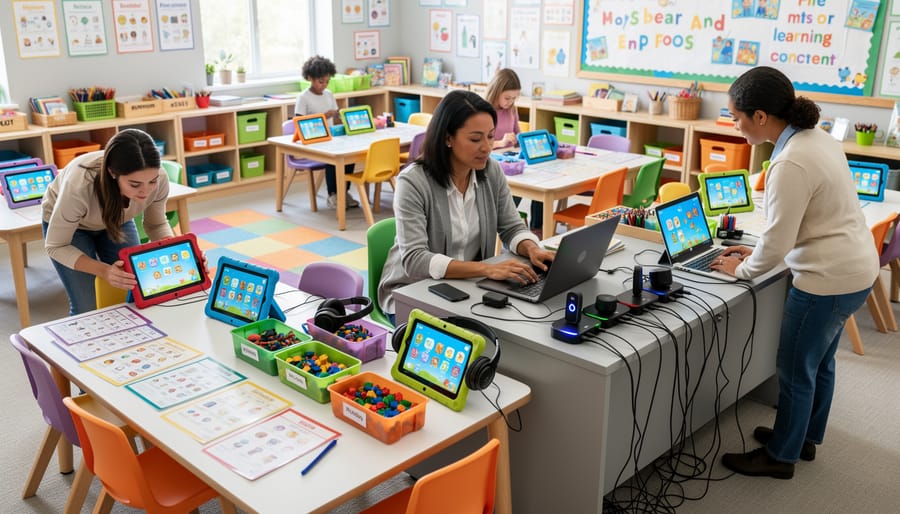
Before introducing TK learning games into your classroom, you’ll need a few core resources and some upfront preparation. The good news: most Canadian schools already have the basics in place, and many platforms offer free or subsidized access for educators.
Technology Requirements
Your classroom will need:
- One device per student or small group (tablets, Chromebooks, or desktop computers)
- Reliable internet connection with adequate bandwidth for simultaneous game use
- Interactive smartboard or projector for whole-class demonstrations
- Headphones or earbuds to minimize classroom noise during individual play
- Charging station or power access for devices
If your school operates on a shared-device model (common in many Ontario and British Columbia elementary schools), you can rotate students through game stations or schedule computer lab time. Some boards provide take-home device programs, particularly in Quebec and Alberta, which extends learning beyond classroom hours.
Software and Platform Access
You’ll need accounts on one or more TK game platforms. Popular choices in Canadian classrooms include Prodigy Math, ABCmouse, Starfall, and Raz-Kids. Most platforms offer free teacher accounts; premium features typically require school or board-level subscriptions. Check with your school’s IT coordinator or instructional technology lead about existing licenses before purchasing independently.
Many platforms are available in both English and French, essential for dual-track schools and French immersion programs across all provinces.
Teacher Preparation
Spend 30 to 60 minutes exploring each game yourself before introducing it to students. Familiarize yourself with the interface, understand the progression system, and identify potential technical hiccups. Review your provincial curriculum documents (available through each Ministry of Education website) to confirm alignment between game content and learning outcomes for your grade level.
Consider attending a professional development workshop on game-based learning. Teachers’ associations in BC, Ontario, and Manitoba regularly offer sessions on integrating educational technology, and many are now available virtually for rural or remote educators.
Important Considerations Before You Begin

Before introducing TK learning games in your classroom, pause to evaluate several critical safeguards and stop conditions. These considerations protect student well-being, comply with Canadian education law, and ensure game-based learning serves every learner effectively.
Screen Time Limits
The Canadian Paediatric Society recommends no more than one hour of screen time daily for children aged two to five, including classroom use. For TK-aged learners (typically four to five years old), split game sessions into 15-20 minute blocks with breaks for movement and hands-on activities. Excessive screen exposure at this age can affect attention span, sleep patterns, and motor skill development. Consult your school’s wellness policy and the screen-time guidance for preschoolers to set age-appropriate limits.
Privacy and Data Protection
Canadian provinces enforce strict privacy laws governing student data. In Ontario, the Municipal Freedom of Information and Protection of Privacy Act applies to public schools; British Columbia operates under the Freedom of Information and Protection of Privacy Act; Quebec follows Bill 64 requirements. Before collecting any student information through a game platform, verify that the vendor complies with your province’s legislation, stores data on Canadian servers where required, and provides transparent privacy policies. Always obtain parental consent before creating student accounts or tracking progress data.
Accessibility and Age-Appropriateness
Verify that games include accessibility features such as adjustable text size, audio narration, colour-contrast options, and keyboard navigation for students with visual, auditory, or motor challenges. Check the game’s age rating and preview content for developmental fit: a game labelled “K, 2” may still be too abstract or fast-paced for TK learners. Test it yourself first.
When to Stop or Avoid Games
Game-based learning isn’t suitable for every objective or student. Avoid games when the learning goal requires sustained physical manipulation (building blocks, cutting, writing by hand) or deep social interaction. If a student shows frustration, disengagement, or regression in foundational skills, pause and reassess. Games should supplement, never replace, play-based and teacher-led instruction.
Step-by-Step: Implementing TK Learning Games
Step 1: Align Games with Curriculum Outcomes
Start by reviewing your province’s K, 12 curriculum documents, available through your provincial Ministry or Department of Education website. Look for the Kindergarten or Early Years section and identify specific learning outcomes for literacy, numeracy, social-emotional development, and motor skills. Most provincial curricula organize these into broad competencies and measurable indicators.
Once you have your target outcomes listed, search for games that explicitly address those skills. Many pre-K learning games now tag their activities by curriculum strand, making this matching process easier. Check your school board’s digital learning portal or library media centre for approved game lists. Boards in Ontario, British Columbia, and Alberta often maintain vetted resources organized by grade and subject.
Cross-reference games against your learning goals: if your outcome is “recognize numerals 1 to 10,” confirm the game practices exactly that skill at the appropriate level. Avoid games that skip ahead or introduce unrelated concepts. This alignment ensures game time directly supports your teaching plan rather than functioning as filler.
Step 2: Test and Evaluate the Game
Before introducing any TK learning game to your students, spend 15 to 20 minutes playing it yourself. Navigate through at least three activities or levels to understand the pacing, instructions, and reward systems students will encounter.
Check whether the game’s difficulty matches your learning objectives. Can a typical five-year-old follow the on-screen prompts independently, or will they need one-on-one support? Note any complex vocabulary or multi-step tasks that might frustrate early learners.
Verify technical requirements next. Confirm the game runs smoothly on your classroom devices, loads quickly with your internet connection, and supports touchscreen or mouse input as needed. Test on the actual hardware students will use, not just your teacher laptop.
Finally, review accessibility features. Look for adjustable text size, audio narration options, colour contrast settings, and compatibility with assistive technologies like screen readers. Provincial accessibility standards require equitable access, so ensure the game accommodates diverse learners before your first lesson.

Step 3: Set Up Classroom Accounts and Groups
Once you’ve selected and tested your TK learning game, the next task is creating classroom accounts. Most platforms offer teacher dashboards where you set up a class roster by entering student names (first names only in many Canadian boards to protect privacy). Choose simple, memorable usernames, many teachers use a pattern like “grade-initials-number” (e.g., tk-js-01) to help young learners remember.
Configure privacy settings before students log in. Disable chat features if available, restrict data sharing with third parties, and turn off any advertising. Canadian provincial privacy laws require parental consent for collecting student information, so check your school board’s approved platform list and consent forms before finalizing accounts.
Generate login cards with usernames and picture passwords (many TK-appropriate platforms use icon-based authentication instead of typed passwords). Laminate these cards or send secure copies home. Group students by learning level if the platform allows differentiated content, this lets you assign appropriate challenges without singling out individual learners during whole-class introductions.
Step 4: Introduce the Game to Students
Start with a whole-class demonstration on a smartboard or projector. Play through the first level yourself, narrating each tap and choice so students see exactly how the game works. Pause to point out key buttons, where to find instructions, how to submit answers, what the help icon does.
Set clear expectations before anyone logs in. Tell students this is learning time, not free play. Explain what success looks like: completing activities, trying their best, and asking for help when stuck, not racing to finish first.
Establish three or four simple rules and display them near your classroom devices. Common examples: one game at a time, headphones on, raise your hand for technical problems, and stop when the timer rings. Practice these rules during your first session.
Walk students through their first login together. Have them find the game icon, enter credentials slowly, and reach the main menu as a group. This prevents twenty hands shooting up at once and builds confidence for independent play later.
Step 5: Monitor Progress and Adjust
Once your TK learning games are running, regular check-ins help you fine-tune their impact. Most platforms provide teacher dashboards showing time spent, levels completed, and accuracy rates, review these weekly to spot students who are racing ahead or stuck on the same skill. Walk around during game time to observe: Are students focused or frustrated? Are they asking classmates for help in productive ways? At the end of each session, ask a quick verbal check, thumbs up, thumbs sideways, thumbs down, to gauge enjoyment and confidence. Collect this informal feedback in a simple log to stay organized and track patterns over time. If engagement drops, try shortening sessions, switching to a different game for variety, or adjusting difficulty settings within the platform. If several students struggle with the same concept, pause the game and reteach that skill directly before returning to digital practice. This iterative cycle, check data, observe, ask, adjust, keeps TK games aligned with your students’ evolving needs rather than running on autopilot.
Popular TK Game Platforms Used in Canadian Schools
Several game-based learning platforms have gained wide adoption in Canadian Transitional Kindergarten and early primary classrooms. Understanding which tools are available in your province, their cost structures, and language options will help you choose the right fit for your students.
Prodigy Math is one of the most widely used platforms across Canada, particularly in Ontario, British Columbia, and Alberta school boards. This adaptive math game is free for teachers and students, with optional paid features for parents. It offers full English support and limited French content, making it popular in primarily English-language schools. Prodigy aligns well with provincial numeracy outcomes for early learners.
Raz-Kids (part of the Learning A, Z family) focuses on early literacy and reading comprehension. Many boards in Ontario, Quebec, and the Atlantic provinces use Raz-Kids for guided reading. It requires a school or district subscription but provides extensive levelled readers in both English and French, making it valuable in bilingual settings.
Seesaw serves as both a digital portfolio and learning activity platform. Students in TK through Grade 2 across all provinces use Seesaw to complete interactive assignments, record responses, and share learning with families. Basic features are free; schools typically pay for the premium version that offers better analytics. Seesaw supports multilingual communication, helpful for families new to Canada.
Osmo combines physical manipulatives with tablet-based games, popular in British Columbia, Ontario, and Saskatchewan classrooms. Schools purchase Osmo kits (hardware plus game subscriptions), which range from CAD $100 to $300 per set. Content is primarily in English, though some games are language-neutral and rely on visual problem-solving.
ABCmouse and Starfall also appear in some Canadian TK classrooms, especially in resource centres and learning support environments. Both operate on subscription models and focus on early literacy and numeracy in English.
Check with your school board’s learning technology coordinator to confirm which platforms your district already licences and supports.
Checking Results and Next Steps
Once TK learning games are running in your classroom, track whether they’re actually helping students learn. Within the first two to three weeks, review student progress through the game platform’s built-in analytics. Most platforms show completion rates, accuracy scores, time spent per activity, and skill mastery levels. Compare this data to your curriculum outcomes from Step 1: if students are consistently mastering targeted skills and moving through learning progressions, the game is working. If completion rates are low or accuracy stays flat across multiple sessions, adjust the game difficulty, shorten play sessions, or pair the game with direct instruction.
Gather direct feedback from students weekly. Ask simple questions during circle time or use a quick thumbs-up/thumbs-down poll: Do you understand what the game is teaching? Is it too easy or too hard? Do you enjoy playing it? Young learners will tell you immediately if a game is frustrating or boring. Their enthusiasm and voluntary engagement are strong indicators of fit.
Communicate game use to parents through a short email template or classroom newsletter. Explain which game you’re using, what skills it targets, and how it fits into the curriculum. For families new to Canada, clarify that game-based learning is a recognized instructional method across Canadian provinces and outline any screen time limits you’ve set. Invite parents to share what their child says about the game at home; this feedback often reveals engagement and retention better than classroom observation alone.
Document your findings for administrators and professional development records. Create a brief summary noting the game name, target outcomes, implementation dates, assessment results, and any adjustments made. Many Canadian school boards ask for evidence of digital learning effectiveness during performance reviews or technology planning cycles. Share successes with colleagues through your school’s professional learning community or provincial teacher networks like the Ontario Teachers’ Federation or BC Teachers’ Federation. These groups often host forums where educators exchange vetted game recommendations and troubleshooting tips.
When results are positive and students are progressing, scale up by introducing additional games for different subject areas or extending play time slightly. If a game isn’t delivering results after four weeks of adjustments, pivot to a different platform rather than forcing it. Not every tool works for every class, and flexibility is key to effective game-based learning.
Common Questions About TK Learning Games
What if students don’t have devices at home?
Focus on in-class game time and coordinate with your school’s tech support or library to explore device loan programs many Canadian boards offer. Communicate clearly with families about the classroom-only nature of game activities so they don’t feel pressure to purchase equipment.
How much class time should be game-based?
Most Canadian educators limit TK learning games to 15-20 minutes per session, two to three times weekly, balancing screen time with hands-on play and outdoor learning. Provincial early learning frameworks emphasize variety, so games should supplement rather than replace other activities.
Are these games used in all provinces?
Game-based learning is widespread across Canada, though specific platforms and adoption rates vary by province and school board budgets. Quebec schools often prioritize French-language games, while rural boards may face bandwidth constraints that shape platform choices.
How do I communicate game use to parents who are new to Canada?
Send a short welcome letter in plain language explaining what games you’ll use, why they support learning goals, and that no home access is required. Offer to demonstrate the games during parent-teacher meetings, and share cultural adjustment tips that help newcomer families understand Canadian classroom technology practices.
If a student struggles with a particular game, pause and assess whether the difficulty level matches their skills or if technical navigation is the barrier. Pair them with a peer buddy, simplify the task, or switch to a different game that targets the same learning outcome, flexibility matters more than completing every activity.
TK learning games offer a powerful way to engage young learners while meeting curriculum outcomes across Canadian classrooms. They support differentiated instruction, build digital literacy, and provide real-time feedback that helps you adjust your teaching on the fly.
Start with one game aligned to a single learning objective, observe how your students respond, and expand from there. Small experiments yield practical insights you can build on throughout the year.
Study Canada connects international educators with classroom resources, certification pathways, and teaching opportunities nationwide. Reach out for personalized guidance as you navigate game-based learning in your new Canadian school community.